
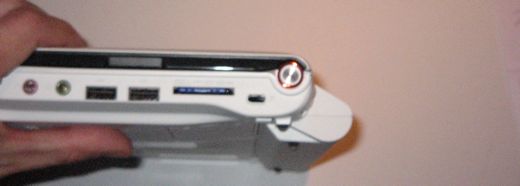
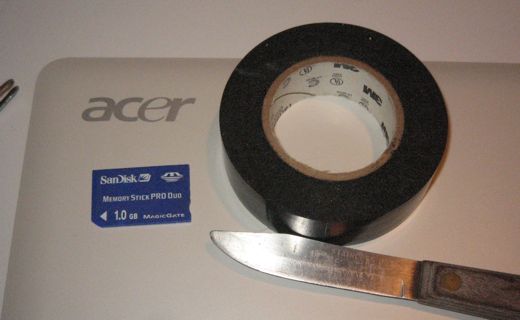
Greetings, fellow hosed person. If you have found this post, it is because you, too, tried to put your tiny memory stick in your laptop without the adaptor, and now realize that it is stuck for good. Tweezers are too big to fit in that little slot, and it looks pretty hopeless. Let me share my experience with you.
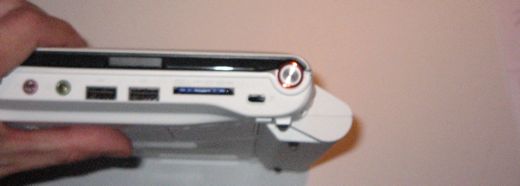
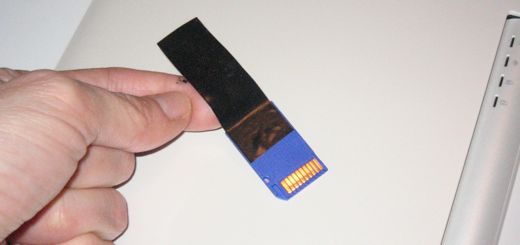
Get some good, sticky tape. I didn’t have duct tape, and thought masking tape might not be sticky enough. We had a roll of electrical tape, though, and that worked just fine.
Cut off a piece a few inches long. Carefully slide it – sticky side toward the memory stick – into the slot. Use a knife to smooth it onto the memory stick, then remove the knife and pull on the tape. I had to do it twice since the first piece of tape was barely sticking to it. Worked like a charm.
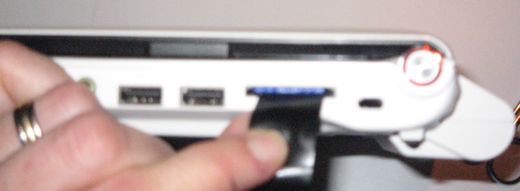
So go & get all MacGuyver on it, you! Good luck! If you found this post useful, please mail me one million dollars. Thanks.
UPDATE: Despite my mannish-looking hands, this is actually Lauren writing, not Lloyd. The ‘dude’ and ‘bro’ comments are starting to give me a complex. 🙂
thanks!!!! u saved me from BIG trouble
I’m cracking up at this… And also, glad you’re the genius soul who would not only fix the problem, but also let everyone else know how. 😀
This happened within the first hour of owning the laptop. Some choice words were spoken around here before it was fixed. 🙂
i used tooth picks but electric tape works too
Thankyou! Thankyou! Thankyou!
It worked 🙂
oh dude,thank you.
just to mention that I was pleasantly surprised how many of us “r-tards” there are actually.
I haven’t tried it yet but I think you’re a genius! My wife is leaving the country in 24 hours and I just downloaded photos from her memory stick to my laptop because the pc kept crashing -- and now guess what? The card is stuck. I’m about to go and do your McGyver trick -- thank you so very much 🙂
You, sir, are a saint! I managed to do this on the first night of owning it and was about to tear my hair out. Thank you!
This some awesome advice thanks.
this is the stupidest solution to the stupidest problem. and im glad you put it on here so i can save my self from the angry wrath of my sister.
Yeah, sister wrath is the worst kind. 😉
I think you deserve a Practially helpful Diploma (Ph.D.) in emergency engineering, with all the rights and privileges thereto. This is the stuff of movie legends (like in Apollo 13).
I had to do it twice. Like what the author says, make sure it’s a very sticky tape, duck tape might do more harm than good, though. What a life-saver. Well done. Thank you. 🙂
Thanks, zch24- from Manila, Phils! 😀
you bet 🙂
Thanks, now i know what happen with my card (Is to small). I get it off with 2 mini screw drivers, but next time i will try your idea, because is great. Now i try to find the adapter.
ya got one stuck last night no instruction in all of acer docs and a little plastic peice that looks like an adapter but isnt arrrgh! Thanks I Thought I was gonna have to take it apart!
Thanks!
You have to keep the plasic card in with the memory stick you put in so that this does not happen. You put your memory stick on top of the plastic thing and it clicks in…
YOU SAVED MY LIFE! If i could ever meet you…i’d kiss you for sure.
The memory stick has been stuck to my laptop since last week and i’ve been keeping it quiet because it’s my bro. Everyday i have to come up with different excuses as to where it is. NOW I FINALLY GOT IT OUT.
I SO LOVE YOU.
Awww…… thanks, Id!
Brilliant thinking out the box, work in seconds and saved me doing a possible tear down that looked silly difficult. 😀 I wish you all the best in life.
You are a genius -- thank you!! Wish I had searched for this problem before I spent 30 minutes taking out screws & cursing… Your trick took 30 seconds.
BINGO!!!
I will save money to collect one million dollar for you… 🙂
Thanks in million
You know, I was going to try the sticky tape thing, but I just decided to give the memory stick duo that was lodged in my aspire one a poke with a pair of scissors and it came right out.
Good thing too, I couldn’t find any tape. 🙂
Well, I was able to get the memory stick duo card out of a different acer laptop with a pair of tweezers.
Amazingly, while the little card was stuck in there, the laptop actually recognized the device and scanned it. Ha, it worked.
Of course it goes without saying that it is criminal for these companies to make mutually exclusive proprietary devices like memory cards and power cords. They want you to have to go out and pay top dollar for their stuff, which will not work on anyone else’s stuff.
The memory stick card will now require another adaptor, something else to have to buy and then not be able to find when it comes time to download photos. sheesh.
It is annoying. I threw away the adapter for the memory stick because it was a school camera and we always downloaded pictures using a cable. It would be nice if they could fix this design -- either for the computer or the memory stick.
With my current camera, I’m waiting for a wireless XD card (they have an SD) to be made. That seems like a pretty cool idea!
Oh GOD THANK YOU! Just got it removed in less than a minute. Perfect solution. Thank god your post came up in google!
Memory Adapters! We don’t need no stinkin’ memeory adapters!
Oh yes, yes I do.
Thank you.
OMG. thank you so much. i tried the tweezers and when i read that, i cracked the hell up. thank you so much. =)
P.S. you are SO going to get a shout on my website.
Oh my gosh, thank you! Cheque’s in the mail. If you don’t get it in a week, it must be lost! 😉
Ha! Finally, an offer of payment!
Hi, I wanted to say thanks so much for posting this. It is old, but it helped me out big time. After trying everything from bobby pins to hair clips, super glue to nail files, your method was the one that worked.
It was so weird. The memory stick WAS NOT COMING OUT, goddangit it was staying in there no matter what I wanted. Well when the tape was stuck on there and I pulled, it popped out and my jaw dropped haha
Dude… I stuck it in my girlfriend’s computer not knowing that it needed an adapter… panicked at first, but you saved my ass brudda. Thanks!
that helped. I just used normal tape, then got enough room for tweezers. THANKS A TON!
Yeah! It worked brilliantly. Even with nórmal tape!!
Thanks a lot man
Greetz from Holland
Thanks! Worked great! (I used packing tape, because that’s what I had… worked fine.)
THX SO MUCH FOR THIS AWESOME TRICK GOT SO SCARED WHE THIS HAPPENEd just when i have the chemistry study guide on it got stuck THX so mx
Totally genius! I did feel all MacGuyver, and it worked on my second try. Thanks!
Thank you so much, i was getting aggravated.
Wow, it sounded stupid but it most certainly works.I’ll be sure to tell everyone this li’l trick 🙂 It quite possibly just saved my relationship, believe it or not. You’re a genius mate…thanks.
My mom was gonna kill me…
Thanks
Thank you so much!!!! It actually works great
OMG!
I know this is much later, but this gave me the idea to fold some tape over to make a “handle” so I could put it in without worrying about how to get it back out!
Thank you!
thank you so much i almost crraped myslef because it was stuck however this happend to my cuz and hes like just use tape and not after 10 seconds of googling for help i founf this page thanks so much 🙂
Hey sis! You’re a DUDE! It cracks me up that it took a GIRL to come up with this idea.
It’s my man hands that throws everyone off. 😉
hey. i just got a laptop for christmas. i figured i would try to dload some psp demos to my memory stick. i put the card in and dload my stuffs. when i try to take the card out, i see i am totally roflboned. thats when i decide to surf the web for an idea after an hour and a half of failed attempts with tweezers. i find this and i think, are there that many people as dumb as me??? i got it out using scotch tape and a credit card, but the same basic idea. i owe you one!
Thanks! I was going to try tweezers, but this was even simpler!
Totally fab -- hooray for you!
You sir, are a GOD.
Sad to say but it works =) thx soo much
o god, thank you. i’ve been trying for the last 30 min using tweezers and paper clips. lol, stupid me.
this isn’t even my laptop, it’s my sister’s and i’m using it without her permission. hahaha. you saved me, thanks a lot.
thanks dude saved my acer 1410!! and the memory stick. TYmuch
Excellent and lifesaving tip, thank you. Is there no way a memorystick plus DUO will work on this awful Acer Aspire cardreader? It says Memorystick Plus, but not “Memory stick plus duo”….. thanks again!
Thank you so much!
Thanks a lot!
Thanks alot. u saved me alot of tyme. i was trying to take it out for the past two hour.
Thanks a lot dude
Thank you Thank you Thank you
Thank you. Using simple office tape worked for me. Well done!
OMG!!! Thank you so much, I was freaking out when I pushed it in further and further and it wouldn’t click back out. You are amazing, I’m pretty sure you could survive in the wilderness with just a knife and a piece of duct tape. Cheers.
HAHAHA! I just read the update on this post! Dude, you are so funny Lauren. Thanks for the laugh, bro.
I want to thank you for this excellent solution. We are on vacation and my friend forgot that our netbook only takes SD cards. Went nuts trying to get the stick out…..searched and found your site. Went to a hardware store this morning and as others have said, 30 seconds later, stck was out……………..
Eileen
thanks for the post -- at least I know I’m not alone! What a STOOPID design flaw.
I just did this after trying many ways of taking that sh!t out of it. THANK YOU SO MUCH! You saved my life!
thanks very much I adapted your method by using two knife points as tweezers as didn’t have any electircal tape so another method available for people.
Thanks though, wouldn’t have thought of it without reading your solution
can somone help me with a similar problem i have a psp go i thought you can put m2 & micro sd cards so i put a sd card in the psp and the light flashed so i tryed to coppy somthing and it sayed “no memorey stick inserted” i checked it to see if it was inserted propley and i attempted to get out and it was stuck can anyone help its my new psp go
thx dude my bro got so mad then i found this n did what u said
I cannot even begin to describe how much you literally JUST saved my butt! Thank you! Thank you! Thank you!
Thanks for this post. My son stucked his memory stick for his PSP into my Acer laptop slot. Although for me, the tape didn’t work but the knife did the job. But at least, I’ve got the idea.
Thank you….
thanks! it really worked! 😀
THANK YOU
I used my teeth to remove it but your tip will work too.
DUUUUDE! thank you 2 soooo much! u just saved me from killin myself n possibly my whole family! im an athiest, so it means a lot when i say: Thank God for you guys!!!!!!!!!
Does anyone know what memory stick adapter would be used in an Acer Aspire 5253-BZ412?
Thank you very, very much! This was a genius idea. Once again, thank you! 🙂
You are a genius! I thought I was doomed after I jammed that little fiend in there. Your solution worked like a CHARM! Its out! Thank You so much!
~Paige
You saved me from a big big trouble may god make you the next bill gates thank u very much mann it worked in seconds
DUDE. THANKS!
Like, seriously. This was of great help.
Also, sorry for the “dude”. 🙂
Thank you so muuuuuuuuuch, you saved meeee. It wouldnt have crossed my mind the way you did it. So smart thank you !!!
Thank you!Thank you! Thank you! Thank you!! Totally worked!:) 🙂 My boss would have otherwise killed me!
I gently pushed it out with some scissors, by applying some pressure beneath the memory stick (it’s also thinner than the SD, so there is room for it in the SD port)
It really helped me escape my problem from messin’ up with my brother. I thought this will going to be a rampant war. Million thanks! 😀
Pure Genius Lauren, worked like a charm! Thanks!
Next time I e-mail Acer I will let them know not to make the slot so deep (but they will likely not listen)
Take care, ^_^
John